
E-commerce
Websites for products that need advice (air conditioners, furniture, materials): designed for a Zalo call, not a shopping cart

Short answer: For products that need advice before purchase, such as air conditioners, furniture or building materials, a website does not need to push buyers into a shopping cart. Its job is to give them enough information to trust you, then put call and Zalo buttons exactly where they hesitate. The sale still closes by phone or Zalo.
This article is for owners of stores with a few dozen to a few hundred high-value items, who are used to closing sales by phone and Zalo, and who are planning their own website or already have one whose cart almost nobody uses.
Why the cart is not the main button for considered purchases
A cart suits products the buyer already understands. Products that need advice differ in three ways:
- The buyer is not sure which model they need. How many HP for a 20 m² room, what size for kitchen cabinets, which tile works for an outdoor yard. The question comes before the decision.
- The final price depends on installation. An air conditioner also needs copper piping, labour and a place for the outdoor unit. Furniture depends on size and material. The price on the page is rarely what the buyer pays.
- High-value orders: buyers want to talk to a real person before transferring money, especially if they have never bought from you.
So the main action on the website should be calling or messaging on Zalo. The cart can stay, in a supporting role: a list where buyers collect the models they are interested in and send one quote request.
What buyers need to see before they call
People call once they trust you enough and know enough to ask a specific question. A product page for considered purchases should have:
- A clear model name and product code, so the buyer can say "I'm asking about this one".
- A complete spec table: capacity, dimensions, voltage, material, origin, warranty.
- A price, a price range, or the reason there is no price yet (see below).
- What comes with it: installation or not, whether site surveys are charged, delivery area, who handles the warranty.
- Real photos of the product or of completed jobs, if you have them. Real photos show you actually do the work.
- Selection help: a short table such as "room size to capacity", or a link to a technical advice page.
Without these, the buyer's first question is "what models do you have?", and you start the consultation from zero for someone who may not buy.
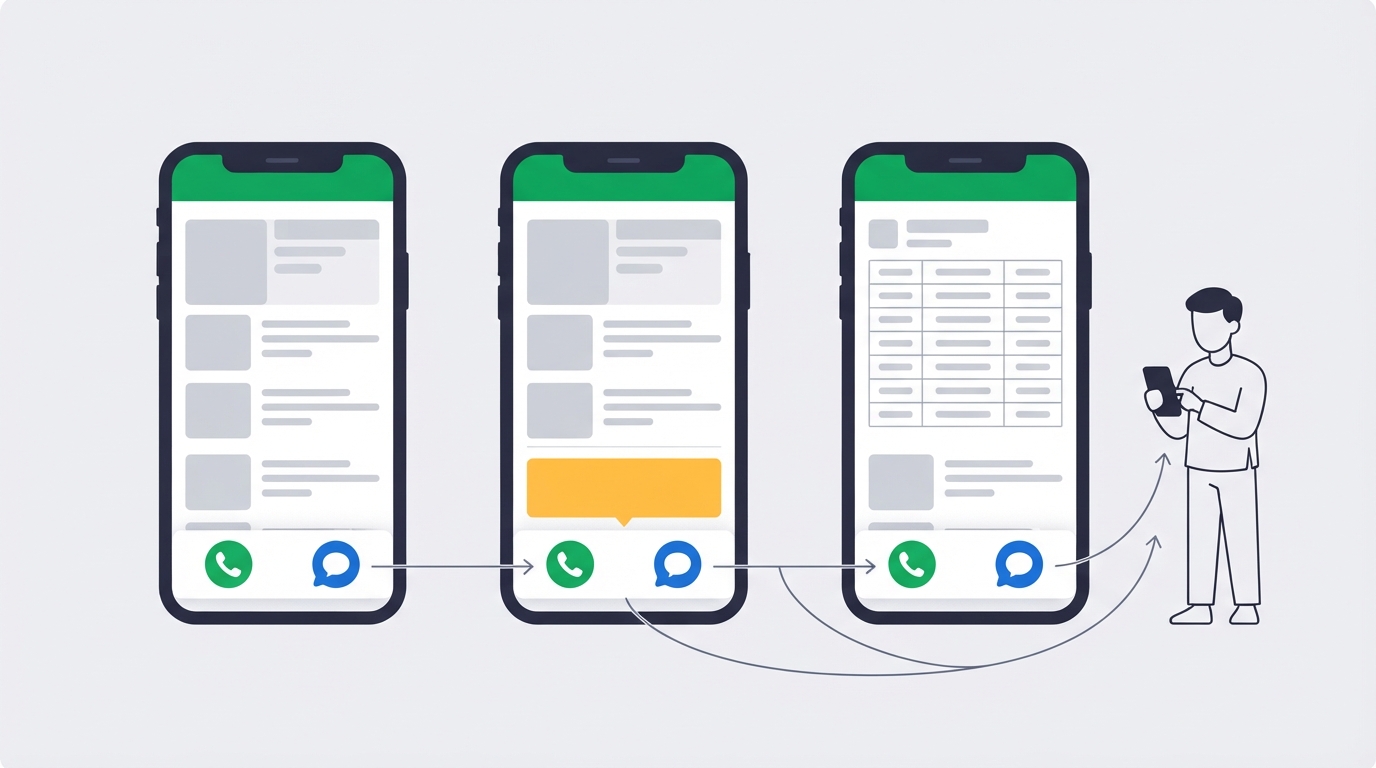
Where to place the call and Zalo buttons
If most of your visitors browse on a phone (you can check in Google Analytics), design for the phone screen first. Four places should have buttons:
- A contact bar fixed to the bottom of the phone screen, with two buttons: Call and Zalo.
- Right below the price on the product page. Write "Call about this model" rather than "Contact".
- After the spec table and after the FAQ section.
- In the header on desktop, showing the phone number as text so people at a computer can dial it from their phone.
A few small details that often get missed:
- Tapping the call button on a phone must open the dialer directly, not another contact page.
- The Zalo button goes to the account that someone is actually monitoring.
- Show the product code near the Zalo button, so buyers include it in their message and the seller knows which model they are looking at.
- Show reply hours next to the buttons, for example "8:00–18:00, Monday to Saturday".
"Price on request" or a listed price: do not make the page a dead end
"Price on request" is not wrong. The mistake is leaving those words on their own. Buyers who have no idea of the price level often hesitate to ask for fear of a sales pitch, or assume it is expensive and leave. There are three options, chosen per product group:
| Option | Suits | Add alongside |
|---|---|---|
| A specific price | Products with stable prices, little dependence on installation | What the price includes and excludes (labour, materials, VAT) |
| "From" price or a price range | Products with many configurations, price depends on size or installation | What changes the price, and how to get an exact quote |
| "Price on request" | Project work, prices that change daily, or made-to-order items | Why there is no price yet, how fast you reply, and Call and Zalo buttons right next to it |
One website can use all three: wall-mounted units show a price, ceiling cassettes show a "from" price, central systems for factories are quoted after a site survey. If you are budgeting for a website like this, our article on the cost of an e-commerce website lists the items to ask about before hiring anyone.
Example structure: the website of an air-conditioning store in Ho Chi Minh City
This is how pages are organised on an air-conditioning website in Ho Chi Minh City built by Simplify. We describe the structure only, not business figures.
- Home page: one sentence on what they sell, where, and whether they survey and install. Two buttons: "View products" and "Get advice".
- Categories by unit type: wall-mounted, ceiling cassette, ceiling-suspended, ducted, floor-standing, outdoor units.
- Product pages: specs, price, call and Zalo buttons, plus a "Request a quote" button so buyers can ask about several models at once.
- Technical advice page: a capacity-by-room-size table and ready answers to the questions buyers usually ask by phone.
- Installation services and past projects page: for commercial and project buyers.
- FAQ on the home page: whether surveys are charged, what a quote includes, who handles the warranty.
What they share: every page leads to the same action, talking to the seller. There is still a cart, but it comes with a "Request a quote" button instead of forcing an immediate checkout.
The website is only the first half: who answers when buyers call
A website for considered purchases is only as good as the person who picks up the phone. Answer three questions first:
- Who answers Zalo and the phone, and who covers when that person is busy.
- How fast you reply. Write a number you can keep; do not write "24/7" if nobody works nights.
- What happens with missed calls. Call back the same day, and send a Zalo message first so the buyer knows you saw the call.
After launch, the website still needs someone looking after it: phone numbers change, prices change with the season, SSL certificates expire, pages slow down as photos are added. A Zalo button pointing at an old number loses buyers without you ever knowing. This is the operations side, so ask who handles it as soon as you hire someone to build the site.
Measure whether the website brings in buyers
Sales closed by phone do not show up on the website, so it is easy to wrongly conclude that "the site brings no customers". Three ways to measure:
- Count button clicks. Add events for the Call and Zalo buttons in Google Analytics 4, and review them weekly and per product page.
- Ask one question when buyers call: "Where did you see this model?" Note it in a notebook or spreadsheet.
- Use a separate phone number or Zalo account for the website if you can, to separate website buyers from regulars.
It does not need to be exact; you only need to know which pages make people call and which pages they read and leave.
A 10-point checklist for a considered-purchase website
- The first sentence on the home page says what you sell and where.
- Categories follow how buyers search (installation type, function), not only by brand.
- Every product has a code and a complete spec table.
- Every product has a price, a "from" price, or the reason there is no price yet.
- A fixed Call and Zalo bar on the phone screen.
- The call button opens the dialer directly; the Zalo button opens the account that is monitored.
- Reply hours and service area are shown.
- There is a product selection guide and an FAQ section.
- There are real photos or past projects, if you have them.
- Someone is assigned to update prices, phone numbers and new models.
Need an e-commerce website built this way? Simplify builds e-commerce websites for stores that sell through consultation, places call and Zalo buttons to match how your buyers actually buy, and then our engineers, the team that builds the platform, operate the website after launch. Get advice on an e-commerce website
Want to see what your own website could look like first? Write a few lines about your store and Simplify builds a trial website, reviewed by a real person, usually within 1 business day, with no payment up front. A site built from a description is an introduction site without product categories. Build a free trial website
Frequently asked questions
Should I remove the cart completely?
Not necessarily. If you have a group of stable-priced products that buyers reorder, a cart is still useful. For everything else, let the cart act as a quote-request list, and make the call and Zalo buttons more prominent than checkout.
Should I use a personal Zalo account or a Zalo Official Account?
A personal Zalo account is easy to start with and buyers already use it. Once two or more people answer buyers, or you want to keep work messages separate from your personal account, consider a Zalo Official Account.
Can a "price on request" website show up on Google?
It can, if the page has real content: model name, specs, selection help. A page with only a photo and the words "price on request" gives search engines very little information. Nobody can promise rankings in advance. See also our article on SEO-ready websites.
Prices change constantly. How do I keep them updated?
Show a "from" price with the date it was updated, and assign one person to update prices on a fixed schedule, for example at the start of each month. Outdated prices cost you the buyer's trust on the very first call.


